
✅ New Minecraft Launchers You Should Try in 2026 (Fresh Picks)

🎮 Bored of the same old launcher list? Same yaar, us too. Prism and TLauncher articles are everywhere, but the launcher scene has actually moved fast in the last year. New names like Cubion, GDLauncher, SJMCL Launcher, and a freshly rewritten SKlauncher have entered the chat, and a few older favorites like Lunar Client have quietly become way more relevant for everyday players too.
So is iss article mein (in this article), we're skipping the launchers everyone has already covered a hundred times and focusing on the newer Minecraft launchers for PC in 2026 that deserve your attention — especially if safety, official accounts, and a smooth modding experience matter to you.
---
🌟 Why a New Launcher Might Actually Be Worth Switching To
Sticking with the same old launcher feels comfortable, but newer tools usually fix real pain points players have been complaining about for years:
- Smarter crash detection instead of confusing error logs
- Built-in support for both CurseForge and Modrinth in one place
- Cleaner UI with less clutter and fewer ads
- Official Microsoft/Mojang login only — no shady cracked-account business
- Better RAM and Java handling out of the box
If a launcher hasn't been updated in years, it's usually falling behind on these fronts. That's exactly why this list focuses on what's actually new and active right now.
---
⚙️ Quick Comparison: Newer Minecraft Launchers (2026)
Switch to landscape mode for better readability on smartphones.
| Launcher | Platforms | Mod Support | Account Type | Best For | Weak Points |
|---|---|---|---|---|---|
| Cubion | Windows / macOS / Linux | CurseForge + Modrinth | Official only | Modpack lovers wanting crash help | Newer project, smaller community |
| GDLauncher | Windows / macOS / Linux | CurseForge + Modrinth | Official only | Hassle-free modded setup | Single banner ad for funding |
| SJMCL Launcher | Windows / macOS / Linux | Modrinth-based | Official only | Tech-savvy users wanting open source | Small user base, English docs limited |
| Lunar Client | Windows / macOS / Linux | Fabric, Forge, Quilt | Official only | PvP, FPS boosts, cosmetics | Heavier on low-end PCs |
| Prism Launcher | Windows / macOS / Linux | Forge, Fabric, Quilt | Official only | Advanced instance management | Slight learning curve |
| SKlauncher | Windows / macOS / Linux | Modpacks (online & offline) | Official + offline | Free-play, budget players | EULA risk, past spyware reports |
| TLauncher | Windows / macOS | Modpacks (cracked play) | Offline / cracked | Lightweight free-play | Malware risk, bans, illegal use |
---
🧱 1. Cubion — The New Modded-First Launcher Built by Players
Cubion is one of the freshest names in the launcher space, and it's built specifically around modded Minecraft from day one. The team designed it with one-click modpack installs and something most launchers don't have: Smart Crash Recovery, which detects common crash causes and suggests a fix instead of just dumping a log file on you.
It pulls modpacks from both CurseForge and Modrinth, supports official Microsoft and Mojang sign-in only, and includes an integrated knowledge base with troubleshooting articles for performance issues, mod conflicts, and corrupted worlds.

Image used for educational purposes only. All rights belong to their respective owners.
Pros:
- Built-in crash diagnosis instead of raw error logs
- One-click modpack installs from CurseForge and Modrinth
- Official-only login, so account safety is solid
- Clean, ad-free interface with smart RAM presets
Cons:
- Younger project, so community size is still growing
- Windows build availability has been rolling out gradually
💡 Tip: If you keep getting random crashes mid-session with modpacks, Cubion's recovery tool is worth testing before you start manually deleting mods one by one.
Verdict:
🔥 Best new launcher for players who hate digging through crash logs — modded convenience with strong account safety.
---
⚡ 2. GDLauncher — Clean, Automatic, and Beginner-Friendly
GDLauncher has been around for a bit but has matured into one of the most polished options for 2026. It runs on Windows, macOS, and Linux, supports both CurseForge and Modrinth, and automatically handles Java versions and mod loaders for you. There's no premium tier — it's funded by a single in-app banner ad that also helps pay mod authors through CurseForge's revenue share.
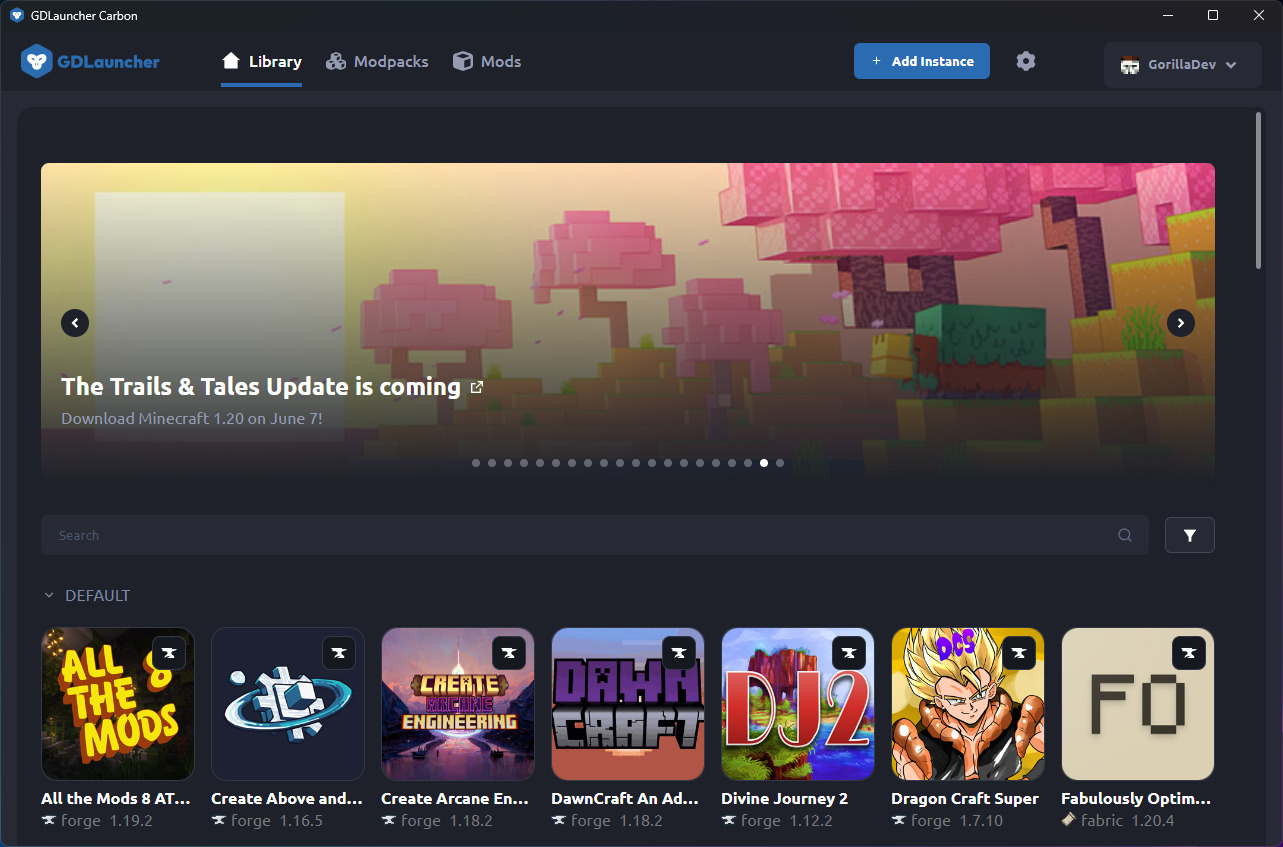
Image used for educational purposes only. All rights belong to their respective owners.
Pros:
- Auto-manages Java versions per modpack
- No manual mod downloading needed
- Free with no hidden premium tier
- Uses official Microsoft authentication only
Cons:
- One small banner ad inside the launcher
- Fewer advanced customization options than Prism
Verdict:
🧡 If you just want modded Minecraft to "work" without fiddling with Java settings, GDLauncher does the heavy lifting for you.
---
🆕 3. SJMCL Launcher — The Open-Source Newcomer
SJMCL is a genuinely new entrant that's been picking up steam, built as an open-source launcher for Minecraft Java that uses modern, lightweight technology under the hood. It's still niche compared to the bigger names, but it's a good pick if you like trying open-source tools early and want full transparency over what's running on your PC.

Image used for educational purposes only. All rights belong to their respective owners.
Pros:
- Fully open-source codebase
- Lightweight footprint, good for older hardware
- Active recent development (frequent updates)
Cons:
- Smaller community, so fewer guides if you get stuck
- Interface still feels early-stage compared to GDLauncher or Prism
Verdict:
🧪 Worth experimenting with if you enjoy open-source tools, but not yet a daily-driver pick for most casual players.
---
🏆 4. Lunar Client — The Performance & PvP Favorite Reinvented
Lunar Client isn't brand new, but its 2026 version has grown into something much bigger than a simple FPS booster. It now functions as an all-in-one modpack capable of updating a player's mods automatically, with support across Fabric, Forge, and Quilt. It's especially popular with PvP and competitive players chasing extra FPS and built-in cosmetics.
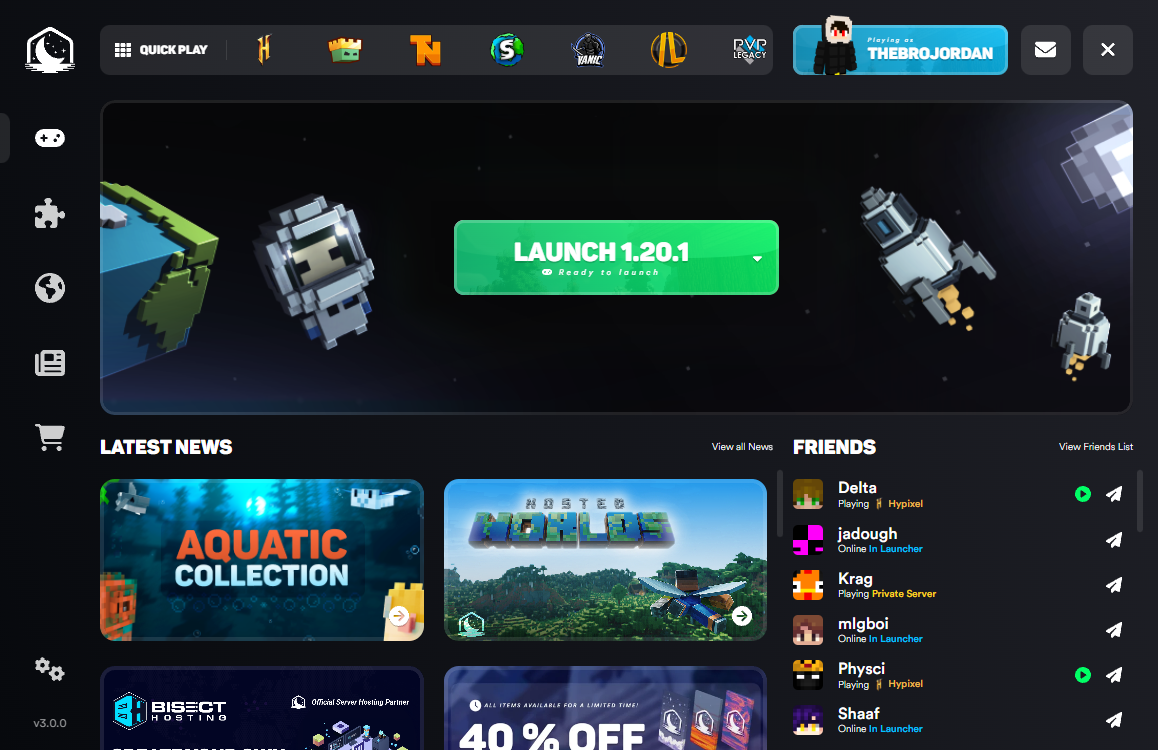
Image used for educational purposes only. All rights belong to their respective owners.
Pros:
- Big FPS boost on supported systems
- Auto-updates mods without manual work
- Popular in PvP and competitive servers
- Built-in cosmetics and UI overhauls
Cons:
- Heavier install size than minimal launchers
- Some cosmetic features are locked behind Lunar+ subscription
Verdict:
⚡ Best pick if performance and PvP-ready features matter more to you than a minimal, no-frills setup.
---
🥈 5. Prism Launcher — Still the Power User's Benchmark
Even with new competitors entering the field, Prism Launcher remains the gold standard most newer launchers get compared against. It's open-source, regularly updated, and gives you full instance-based control — separate setups for each modpack without any conflicts. According to recent comparisons, Prism combines the benefits of both Modrinth and CurseForge into one launcher, and being an open-source project means it welcomes community contributions that keep it improving.
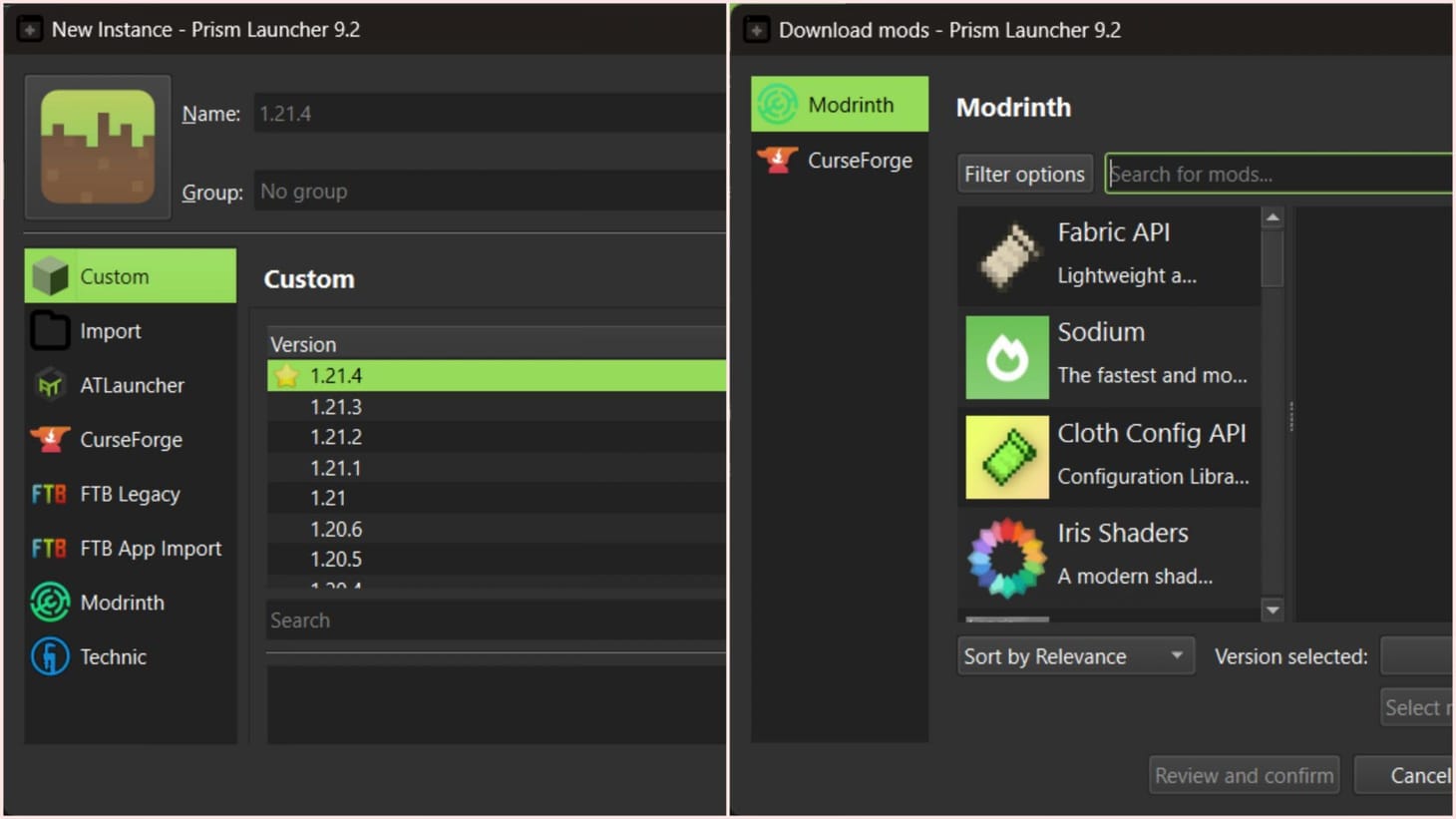
Image used for educational purposes only. All rights belong to their respective owners.
Pros:
- Full instance management for multiple setups
- Combines CurseForge and Modrinth mod libraries
- Open-source, transparent, and actively maintained
- Custom themes for personalization
Cons:
- Slight learning curve for absolute beginners
- No built-in crash-recovery assistant like Cubion
Verdict:
🎯 Still the most trusted all-rounder in 2026 — newer launchers borrow ideas from Prism, not the other way around.
---
Image used for educational purposes only. All rights belong to their respective owners.
🎮 New Launchers That Let You Play for Free (Use With Caution)
Ab agar tumhara budget tight hai aur paid account abhi possible nahi hai (if your budget is tight and a paid account isn't possible right now), there are launchers that let you play without buying Minecraft. But yeh samajh lo (understand this first) — these work by bypassing official login, which means they sit in a legal grey zone and carry real security risk. We're covering them here only so you know what exists, not because we recommend them over the safe options above.
🆕 6. SKlauncher (Rewritten) — The Newly Relaunched Free-Play Option
SKlauncher has been completely rewritten for 2026 with a fresh interface, new theming options, and support for both online and offline play. The new version positions itself as more polished than before, with modpack support and skin/cape customization baked in.
Image used for educational purposes only. All rights belong to their respective owners.
Pros:
- Lets you play without an official purchased account
- Custom skins, capes, and themes built-in
- Supports most recent Minecraft versions and modpacks
Cons:
- Offline/cracked play violates Mojang's EULA
- Past versions have drawn spyware reports from the community
- No official support if your account or files get flagged
Verdict:
⚠️ Free, yes — but treat it as a short-term workaround, not a long-term setup. Scan it with antivirus before installing, and switch to an official launcher once you can.
💀 7. TLauncher — Still the Most Downloaded Free-Play Option
TLauncher remains the most well-known free-play launcher among casual and budget players, largely because it's lightweight and works on low-end PCs. It hasn't changed its core approach: cracked-account access to the full game, no purchase required.

Image used for educational purposes only. All rights belong to their respective owners.
Pros:
- Completely free, no purchase needed
- Runs smoothly even on weaker hardware
- Large skin and mod customization options
Cons:
- Frequently flagged by antivirus software
- Violates Minecraft's official terms of service
- Higher risk of malware bundled in download mirrors
Verdict:
🚫 Works, but it's the riskiest pick on this list. If account security and long-term safety matter to you, this should be your last resort, not your first choice.
---
🧠 Final Verdict — Which New Launcher Should You Pick?
| Category | Winner | Why |
|---|---|---|
| Best for Modpack Players | 🔥 Cubion | Smart crash recovery + one-click installs |
| Best Beginner-Friendly | 🧡 GDLauncher | Auto Java handling, zero setup stress |
| Best for Performance/PvP | ⚡ Lunar Client | FPS boosts, auto mod updates |
| Best Open-Source Pick | 🧪 SJMCL Launcher | Fully transparent, lightweight |
| Best Overall (Power Users) | 🎯 Prism Launcher | Mature, flexible, community-trusted |
| Best Free-to-Play Pick | ⚠️ SKlauncher (Rewritten) | Most polished free-play option, but use cautiously |
---
💸 Can You Play Minecraft for Free with These Launchers?
Let's clear the confusion — most launchers themselves are free to download, but Minecraft's license isn't. A couple of newer entrants do let you bypass that purchase, though it comes with real legal and security trade-offs. Here's exactly what's free and what isn't, launcher by launcher:
| Launcher | Free to Download | Play Minecraft Without Purchase | Legal? |
|---|---|---|---|
| Cubion | ✅ Yes | ❌ No | ✅ Fully legal |
| GDLauncher | ✅ Yes | ❌ No | ✅ Fully legal |
| SJMCL Launcher | ✅ Yes | ❌ No | ✅ Fully legal |
| Lunar Client | ✅ Yes (core features) | ❌ No | ✅ Fully legal |
| Prism Launcher | ✅ Yes | ⚠️ Offline only | ✅ Legal if you own the game |
| SKlauncher | ✅ Yes | ✅ Offline / Cracked | ⚠️ Not officially legal |
| TLauncher | ✅ Yes | ✅ Offline / Cracked | ❌ Violates EULA |
So bottom line: every launcher on this list is 100% free to download. But only Cubion, GDLauncher, SJMCL, Lunar Client, and Prism Launcher require a genuine purchased account to actually play — which is what keeps them safe. SKlauncher and TLauncher let you skip that purchase, but you're trading safety and legality for it, so weigh that trade-off carefully before installing either one.
---
🧩 FAQs
Q1. Are these new Minecraft launchers safe to use?
Cubion, GDLauncher, SJMCL, Lunar Client, and Prism Launcher are all safe — they use official Microsoft or Mojang sign-in and don't support cracked accounts. SKlauncher and TLauncher allow offline/cracked play, which carries real legal and security risk, so use those only if you understand and accept that trade-off.
Q2. Do I need a paid Minecraft account for these launchers?
For Cubion, GDLauncher, SJMCL, Lunar Client, and Prism Launcher — yes, an official purchased account is required. SKlauncher and TLauncher are the exceptions, letting you play offline without buying the game, though this isn't officially sanctioned by Mojang.
Q3. Which new launcher is best for low-end PCs?
SJMCL Launcher and GDLauncher are the lightest on system resources among the official options. TLauncher is also known for running smoothly on weaker hardware. Lunar Client and Cubion can run heavier depending on the modpack or cosmetics you enable.
Q4. Can I switch between launchers without losing my worlds?
Generally yes, since most launchers read from your existing .minecraft folder or let you import saves. Still, always back up your worlds folder before switching to a new launcher.
Q5. Is it worth using a free-play launcher like SKlauncher or TLauncher long-term?
Not really. They're useful as a stopgap if you can't buy Minecraft right now, but offline/cracked play violates Mojang's EULA and carries malware and ban risks. Once you can, switching to an official launcher is the safer long-term move.
---
🏁 Conclusion
The Minecraft launcher scene in 2026 finally has some real new energy. Cubion brings genuinely useful crash-recovery tools, GDLauncher keeps things effortless for casual players, SJMCL is an exciting open-source experiment, Lunar Client is the go-to for performance chasers, and Prism Launcher still holds its ground as the dependable all-rounder everyone else is compared to. On the free-play side, the rewritten SKlauncher and ever-popular TLauncher remain the go-to options if buying the game isn't an option yet — just go in knowing the trade-offs.
Whichever one you pick, prioritize an official-account launcher wherever possible — it protects your progress, your data, and the wider modding community that keeps Minecraft alive. Try one, test your favorite modpack, and see which fits your playstyle best. 🌍🔥
Still confused which launcher to pick?
Drop your PC specs and play style in the comments — we'll help you find your perfect match!
Ask Us---
⚖️ Disclaimer
This article is for educational and informational purposes only. Minecraft™ and all related assets are the property of Mojang Studios and Microsoft. We do not promote or endorse the use of unauthorized, cracked, or modified launchers that violate Mojang's End User License Agreement (EULA). Readers are advised to download software only from official websites and use legitimate accounts whenever possible. The author and publisher are not responsible for any account bans, data loss, or security issues resulting from the use of third-party launchers.
Hey, Harsh i know this sound kinda weird but there are launchers for playing java in mobile so, can you pls also post a blog for it for low end device to high end device pls. I would too much thankful for it .
ReplyDelete